Swift PDF Reader & Converter
ApHouseBDProductivity
4.339.00 Reviews
- Version
- 1.1.2
- Installs
- 100.00K
- Age Rating
- Everyone
Screenshots
Our Review of Swift PDF Reader & Converter
 Analysis by Appyee
I tested Swift PDF Reader & Converter as the sort of practical tool that can quietly become useful on a shared phone or tablet. Its job is straightforward: help people open and work with PDF documents without turning a simple reading task into a complicated project. In my experience, that focus makes it appealing for households where one device may be used for school papers, receipts, forms, manuals, travel documents, and work files during the same day.
The app comes from ApHouseBD and sits in the productivity category. It is free to use, carries an Everyone age rating, and is currently listed as version 1.1.2. Its store summary presents it as a document companion, while the shorter description points to fast PDF reading. Those descriptions are brief, but they match the main reason I would install it: I want a document open quickly, readable on a small screen, and easy to handle without reaching for a full office suite.
It has reached over one hundred thousand installs and holds a 4.3 average from more than six hundred ratings, with dozens of written reviews. That gives it a useful level of public adoption, although I still think the best way to judge it is by the kind of document routine you have at home. A lightweight reader can be a better fit than a feature-heavy editor for one person, while another user may need more advanced document management.
How it fits a shared household device
A realistic example is a family tablet kept in the kitchen or living room. One person downloads a school worksheet, another opens a product manual, and someone else checks a form received by email. With a dedicated PDF reader, each task starts from the same basic point: open the document, read it, and decide what needs to happen next. That is less distracting than launching a broad office application that presents tools you may never use.
I find this especially useful when the document is temporary. If I only need to check a page of instructions, confirm a booking detail, or read a notice, I do not want to create a new project or sort through editing controls. Swift PDF Reader & Converter is most convincing in that quick-access role. It is a focused utility rather than something I would choose as the central workspace for every file in the home.
The shared-device angle also changes how I think about convenience. A reader used by several people should be easy to understand without a tutorial. A parent may open a form, a teenager may read study material, and another adult may check a scanned document. The value is not just speed; it is reducing the number of steps between receiving a PDF and making sense of it.
There is a trade-off, though. Shared devices often contain documents belonging to different people, and a general-purpose reader should not be treated as a private vault. I would avoid leaving sensitive files open on a communal screen. After reading a bank notice, medical document, employment form, or identity-related file, I would close it and return the device to a neutral screen. The app can help with access, but it does not replace sensible household habits.
What I would use it for day to day
My strongest use cases are short reading sessions. I would use it to check a downloaded instruction sheet before assembling something, review a school handout while sitting with a child, or read a document while away from a computer. The app’s productivity value comes from making those small moments less dependent on a desktop workflow.
It can also serve as a first stop when someone sends a PDF and I do not yet know whether I need to edit it, convert it, print it, or simply read it. Opening the file first helps me decide. That sounds minor, but it avoids installing or opening a more elaborate tool before I understand the task.
For repeated work, I would create my own simple routine around it: open the file, check the title and pages, read it, then move or remove the document using the device’s normal file tools if it is no longer needed. This separation is helpful because the reader handles the document view, while the operating system remains the place where I organize personal files.
A less obvious tip is to treat PDF reading as a two-stage process. First, use the app for inspection. Only after confirming that the file is the correct version should you send it onward, print it, or share it. This matters on a shared device, where similarly named files can easily be confused. The app is useful as a checkpoint, not just as a display window.
Setup without confusing household boundaries
The app supports Android devices running version 8.0 or later, so compatibility is worth checking before installing it on an older phone or tablet. On a modern shared device, I would keep the setup deliberately simple. Install it under the device profile that will actually use it, open one ordinary PDF, and confirm that the reading experience feels comfortable before moving important documents onto the device.
I would not assume that installing a PDF reader creates separate spaces for family members. If several people use the same Android profile, their documents and recent activity may be part of the same device environment. That is not a criticism unique to this app; it is an important boundary for shared hardware. Separate device profiles or separate devices are a better answer when privacy matters.
For a child’s tablet, I would test the workflow with a harmless worksheet or public document first. The Everyone rating makes the app suitable for a broad audience in age terms, but an age rating is not the same as a family document policy. Adults still need to decide which files are placed on the device and whether the child should be allowed to open documents received from unknown sources.
I also recommend deciding in advance where household PDFs belong. If everyone downloads files into the same general location, the app may be easy to use but the device can become cluttered quickly. A simple folder arrangement such as school, home, and temporary documents can make the reader more practical. The important point is that organization should be handled intentionally rather than expecting the app alone to create order.
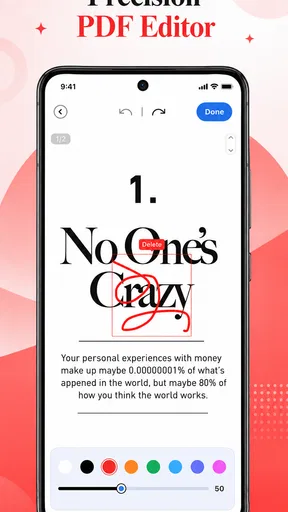
Another useful boundary concerns editing and conversion. The name includes “Converter,” but I would not choose it solely because I need a complex document-production workflow. For a quick PDF task, a focused reader may be enough. If the job involves detailed layout changes, signatures with formal audit requirements, extensive annotations, or collaborative editing, I would compare it with a dedicated office or PDF editor before making it part of a serious process.
Coordinating documents between people
Household coordination is where a simple reader can either help or become part of the confusion. When one person downloads a form for another, I would rename the file clearly through the device’s file manager if needed, using a name that identifies the subject and date in ordinary language. That makes it easier for the next person to recognize the right document before opening several similar files.
I would also avoid assuming that opening a file means everyone has seen it. If a document requires action, the person who downloads it should tell the intended recipient what it is and what needs to happen. The app can display the content, but it does not replace a household reminder system. A visible note, message, or shared calendar entry may still be necessary for deadlines.
For a parent helping with homework, the app is useful because the adult and student can look at the same pages together on one screen. I would use it to locate the relevant section, discuss the instructions, and then let the student work separately if the screen becomes crowded. For a couple sharing travel documents, it can provide a quick way to check details before one person forwards or prints the file.
A practical trade-off appears when several documents must be compared. A dedicated reader is convenient for opening one file, but switching back and forth between multiple files may be slower than using a desktop PDF application or a larger-screen workflow. If I were comparing contracts, schedules, or long manuals side by side, I would prefer a computer or tablet setup designed for multitasking.
One of my more useful habits would be to verify the page count and visible content before sharing a document. A PDF may contain extra pages, an outdated attachment, or information intended for someone else. Reading through enough of the file to understand its scope is a small step, but it reduces accidental sharing on a communal device.
Age, trust, and document privacy
The Everyone rating makes Swift PDF Reader & Converter an approachable choice for families, students, and older relatives who need a clear document utility. I like that the age context does not make the app feel aimed at a narrow specialist audience. A child can use a reader for school material, while an adult can use the same basic tool for household paperwork.
Still, trust has more than one layer. The first is whether the user understands the document. A child may be able to open a PDF but not recognize a suspicious instruction, an unfamiliar request, or a form asking for personal information. The second is whether the device itself is trusted. A shared tablet should not automatically be considered private simply because the app is used for reading.
I would supervise younger users when documents arrive from unknown sources, especially if the file asks them to visit a website, provide information, or install something else. The reader’s role is to show the document; it should not be treated as an approval signal for whatever the document requests.
For older relatives, the main concern may be confidence rather than privacy. I would prepare the device with a few clearly named sample files and explain the basic sequence: open the document, read it, and ask before sharing or deleting anything important. That kind of guidance makes a focused reader more useful than handing someone a complicated suite with many unfamiliar buttons.
I also think it is wise to keep personal and communal document habits separate. I would not use a family tablet as the permanent home for confidential paperwork unless the household already has a clear access arrangement. For private records, a personal device with appropriate screen security and careful file handling is the better choice. This is one of the situations where the convenience of shared access is not worth the exposure.
Where it beats usual alternatives, and where it does not
Compared with opening PDFs in a web browser, a dedicated reader feels more purposeful. Browsers are excellent when a document is part of a web page or arrives as a quick download, but they can leave me juggling tabs, addresses, and unrelated content. Swift PDF Reader & Converter makes more sense when the file itself is the task.
Compared with a full office suite, it is easier to justify for reading-first households. Office apps are better when I need to create documents, revise text, build spreadsheets, or manage a larger project. Their broader toolsets can also make a simple reading job feel heavier. I would choose this app when opening PDFs is the main requirement, not when document creation is the center of my work.
Compared with a browser-based converter, a dedicated app can feel more direct for files already stored on the phone. However, conversion is an area where I would be careful. The right choice depends on the output I need and how accurately the original layout must survive. A basic household conversion is one thing; a business document with tables, signatures, or precise formatting deserves a tool selected specifically for that task.
Compared with a premium PDF editor, this app is easier to consider when the budget is zero and the job is modest. The free price is a genuine advantage for families that only need occasional access. The limitation is that free, focused tools are not automatically substitutes for professional workflows. I would not move a large archive or regulated paperwork process to it without first testing the exact documents involved.
The current version, 1.1.2, is a reasonable starting point for trying the app on a compatible Android device. I would still test it with the PDFs I actually use rather than judging it only by the name. A reader can feel excellent with short text documents and less suitable with complex scans, unusual fonts, forms, or files built for specialized software.
Who should choose it and who should skip it
I would recommend Swift PDF Reader & Converter to someone who wants a free, uncomplicated way to open PDFs on Android, especially when the device is used for school papers, household instructions, receipts, and occasional forms. It also makes sense for a family that wants one familiar reading tool without asking every user to learn a complete office package.
I would be more cautious about recommending it as the only document app for a freelancer, administrator, or student who regularly edits, annotates, signs, reorganizes, and converts files in demanding ways. Those users may save time with a dedicated editor or a desktop application. The same applies to anyone who needs strong separation between multiple people’s confidential documents.
If you are deciding whether it belongs on a shared device, ask three practical questions. Will most tasks involve reading rather than creating? Are users comfortable managing files outside the reader? And is the device appropriate for the privacy level of the documents? If the answers are yes, the app has a clear role. If not, a broader workflow or a more private device may be the wiser investment.
My household verdict
After using it as a focused productivity tool, I see Swift PDF Reader & Converter as a sensible option for everyday PDF access rather than an all-purpose document office. Its strongest quality is its narrow purpose: it helps turn a shared Android device into a convenient place to inspect documents without demanding a complicated setup.
The free price and Everyone rating make it easy to try in a household, and its 4.3 average suggests that many users find the basic experience worthwhile. I would keep expectations realistic, though. The app is most valuable when the document is short, the task is clear, and privacy boundaries are handled by the people using the device.
My recommendation is simple: install it on a compatible Android device, test it with ordinary household PDFs, and build a small file-handling routine around it. Keep private documents off communal storage, explain sharing expectations to younger users, and switch to a stronger editor when the work demands precise changes. For shared, everyday reading, its simplicity is its main strength; for advanced document production, that same simplicity becomes the reason to look elsewhere.
Verdict
Strengths of Swift PDF Reader & Converter
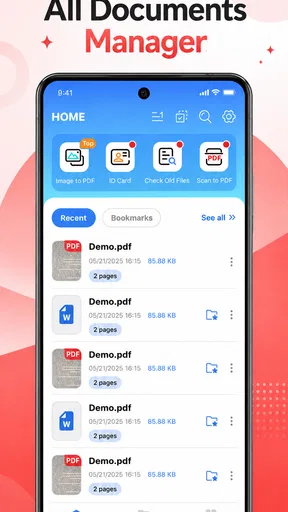
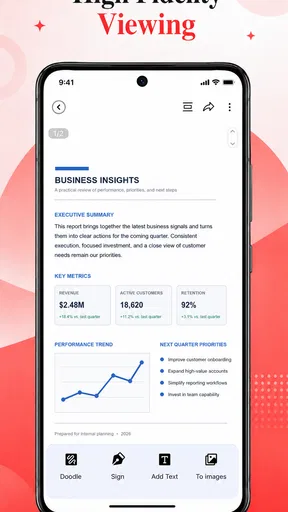
- Opens large PDF files smoothly on most modern devices.
- Supports quick page navigation with thumbnails and search tools.
- Offers useful options for sharing and exporting documents.
- Clean interface makes basic reading tasks easy to understand.
- Can reduce the need for carrying printed documents while traveling.
Limitations of Swift PDF Reader & Converter
- Some advanced conversion features may require a subscription or payment.
- Text recognition quality can vary with blurry or poorly scanned documents.
- Large files may use considerable storage when converted or saved.
- The app may request access to files and storage for full functionality.
- Editing options may be limited compared with dedicated PDF office suites.
Other Releases by ApHouseBD
View All
PDF Spark - Reader & Editor
Productivity4.4
Similar Picks in This Category
View All
Google Calendar
Google LLC4.6

Google Drive
Google LLC4.3

Google Assistant
Google LLC3.9

Microsoft OneDrive
Microsoft Corporation4.6

Samsung Calendar
Samsung Electronics Co., Ltd.4.1

Microsoft OneNote: Save Notes
Microsoft Corporation4.6
Frequently Asked Questions
What is Swift PDF Reader & Converter used for?
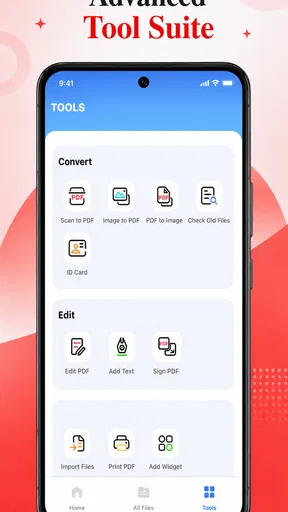
Swift PDF Reader & Converter is designed for opening, reading, and managing PDF documents on a mobile device. It can be useful for viewing study materials, work files, forms, receipts, and other digital documents. Depending on the version and device, it may also provide tools for converting files, sharing documents, searching text, and organizing PDFs for easier access.
Can Swift PDF Reader & Converter convert PDFs into other file formats?
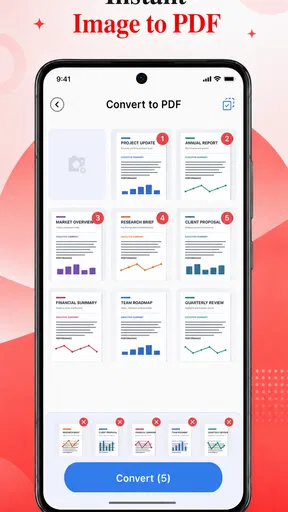
The app is primarily presented as a PDF reader with conversion features, but the exact formats and available conversion options may vary by platform, app version, and subscription plan. Before relying on it for important work, check whether it supports the specific format you need, such as images or editable documents, and review any limits related to file size, page count, or daily conversions.
Does Swift PDF Reader & Converter work offline?
Basic PDF reading will generally be the most suitable feature for offline use once a document has been saved on your device. However, conversion, cloud-related functions, online document processing, advertisements, or other advanced tools may require an internet connection. If you plan to use the app while traveling or without reliable data, download the required files beforehand and test the features offline.
Is Swift PDF Reader & Converter free to download and use?
The application may be available to download without an upfront charge, but some features can be restricted by advertisements, in-app purchases, subscriptions, or usage limits. Advanced conversion tools and other premium functions may not be included in the free experience. It is worth checking the store listing and payment screen carefully before confirming a trial or recurring subscription.
Is Swift PDF Reader & Converter safe for private or confidential documents?
As with any document utility, users should be cautious when opening or converting sensitive files, including identity documents, contracts, financial records, or work materials. Review the app’s permissions and privacy policy to understand whether files are processed locally or uploaded to a server. Avoid sharing confidential documents unless you are comfortable with the app’s storage and processing practices.
